
Customize Telegram Web’s Dark Mode with Rainbow Effects
Overview
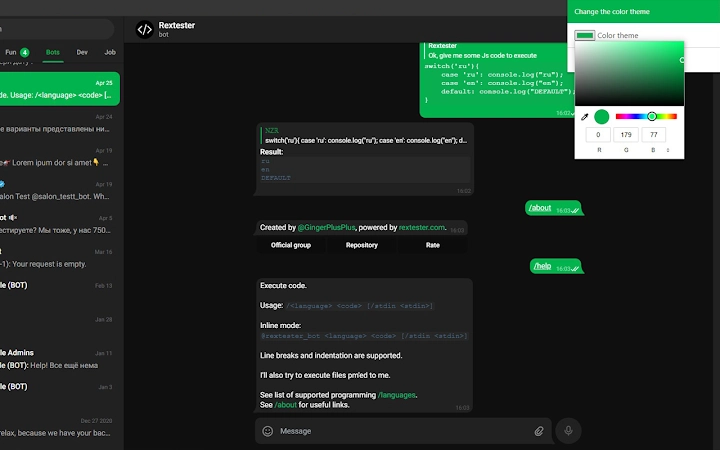
The Telegram Web Color Themes Extension is a specialized browser add-on designed to enhance the visual experience of webz.telegram.org, the web version of Telegram. Specifically tailored for the Z version of the platform, it focuses on dark mode customization, allowing users to modify the color scheme of key UI elements. This includes sent messages, hyperlinks, status indicators, and other visual components. The tool enables users to personalize their interface beyond the default settings, offering both static and dynamic color options.
Designed for users who value aesthetic control over their digital workspace, this extension appeals to Telegram enthusiasts and individuals seeking a more expressive interface. It is particularly useful for those who spend extended time on the web version of Telegram and want a more engaging or personalized experience. The extension does not alter core functionality but enhances visual consistency and user comfort, especially during nighttime use.
Developed by naztar0, the extension is open-source, with its source code available on GitHub. This transparency supports community review and potential contributions. The developer did not provide additional background information beyond the project’s public repository. The tool is intended for use in modern web browsers that support extensions, primarily on Windows, Mac, and Linux systems.
Key Features & Capabilities
- Custom Color Themes for Dark Mode – Users can change the color of sent messages, links, and indicators to match their preferred palette, improving visual distinction and personalization.
- Rainbow Mode – A dynamic feature that automatically transitions through a spectrum of colors, creating a smooth, animated effect across UI elements for a visually engaging experience.
- Focus on Webz.telegram.org (Z Version) – The extension is specifically built for the Z version of Telegram’s web app, ensuring compatibility and targeted functionality.
- Open-Source Transparency – The source code is publicly available on GitHub, allowing users to inspect, verify, or contribute to the project.
- Lightweight Design – With a file size of 1.2 MB, the extension is minimal in resource usage, ensuring it does not significantly impact browser performance.
Real-world usage includes users who want to make their Telegram interface more visually distinct during long messaging sessions or those who enjoy creative customization. The rainbow mode, in particular, can serve as a subtle form of digital self-expression or ambient visual feedback.
User Interface, Workflow & Performance
The extension operates as a browser add-on, meaning its interface is minimal and integrated directly into the browser’s extension management panel. Users access settings through the browser’s toolbar or extension menu, where they can select color presets, enable rainbow mode, or adjust individual color elements.
Navigation is straightforward, relying on standard browser extension controls. The workflow is simple: install the extension, open webz.telegram.org, and configure preferences via the settings panel. No additional setup or configuration steps are required.
Performance observations are based on general software behavior patterns. The developer did not specify resource usage details. However, given the extension’s lightweight nature and focused scope, it is expected to operate efficiently without causing noticeable lag or memory overhead. Stability is likely maintained through the use of standard browser APIs and a limited scope of functionality.
Compatibility & System Requirements
The extension is compatible with Windows, Mac, and Linux operating systems, making it accessible across major desktop platforms. It is designed for use with modern web browsers that support extensions, such as Chrome, Firefox, and Edge.
Version 1.0.0 was released on August 15, 2024, and the installation size is 1.2 MB. The developer did not specify exact system requirements beyond the supported operating systems. Compatibility information was partially provided, with no mention of specific browser versions or hardware specifications.
Pros and Cons
Pros
- Enhances visual personalization of Telegram’s web interface
- Includes a unique rainbow mode for dynamic color transitions
- Open-source with transparent development and public code access
- Small file size ensures minimal impact on system resources
- Free to use with no hidden costs or subscriptions
Cons
- Currently limited to the Z version of Telegram’s web app
- Only supports dark mode customization
- No advanced customization options beyond color selection
- Requires browser extension support and manual installation
- Compatibility with future Telegram updates is not guaranteed
FAQ Section
Is the extension compatible with all Telegram web versions?
The extension is specifically designed for the Z version of webz.telegram.org. It may not function correctly on other versions of the Telegram web app.
Can I use this extension without an internet connection?
Yes, once installed, the extension operates locally within the browser. However, it requires an active connection to webz.telegram.org to function during use.
Is the extension safe to install?
Yes, the extension is open-source, and its code is publicly available on GitHub. Users can review the source to verify its safety before installation.
How do I update the extension?
Updates are managed through the browser’s extension store. When a new version is released, the browser will prompt users to update automatically if enabled.
What type of license does the extension use?
The extension is open-source and distributed under a permissive license, as indicated by the GitHub repository. The exact license type is not specified in the provided information.
Final Thoughts + CTA
The Telegram Web Color Themes Extension offers a focused yet creative way to personalize the appearance of Telegram’s web interface. Its ability to introduce dynamic rainbow effects and custom color schemes makes it a standout choice for users who value visual flair and individuality in their digital tools. While its functionality is limited to the Z version and dark mode, it delivers a consistent and lightweight experience.
For Telegram users who spend significant time on the web app and seek a more expressive interface, this tool provides real value. Its open-source nature and minimal footprint further enhance its appeal. While not suitable for everyone, it fills a niche for those who enjoy customization without sacrificing performance.
Download Telegram Web Color Themes Extension now







